 Reviews
 Years Of Excellence



Art 101: FAQs
If you don't find the information you need below please call 877.545.9322 and our customer care team will be happy to assist you.
How do I send my artwork?
- Email it to your customer care representative.
- Email to [email protected].
- If you are ordering over the web just follow the steps through the ordering process to upload your artwork.
If you have a file that is larger than 10MB:
Art can be uploaded through:
- wetransfer.com
- dropbox.com
- Ask a customer care representative about our FTP site
Can my logo print to the edge of the product?
We recommend that all imprints stay within the imprint areas of the product. This is to ensure that your logo or text doesn't get cut off in the printing process. There are some products that allow for artwork to bleed off of the edge of the product and along with those products we still recommend that all text or logos stay within a "safe area" to ensure there is no loss of artwork when printing.
Can my logo be turned into a 1-color imprint?
Absolutely! Our graphics team will work with your artwork to make it fit on any product with any amount of imprint colors. Refer to our Art Examples Page to see full color logos turned into 1-color imprints.
Can I put a photo on this product?
Photographs can be used many full color products. Unfortunately some products don't allow for photo's to be used in the printing process. If your photo cannot be used our graphics team will do their best to suggest an alternate layout. If you are submitting a photo please refer to the Artwork Guidelines page for additional information about resolution requirements.
Do my logos need to be scaled to size?
Our graphics team can do all the sizing for you. The only thing we ask is that when printing full-color images such as photographs they need to meet the minimum resolution requirements for the product.
What is a fill in issue?
Fill in issues occur when text or parts of the artwork are so small that when the artwork is printed parts of the ink run together and "fill in". This often happens with text, for example a, he, go, mp, qv, b, ed, and so on. If the text is smaller than the minimum requirement the risk for fill in is higher.
What is a breaking issue?
A breaking issues occurs when thin lines in the artwork are less than the minimum point size requirement and the artwork cannot maintain a solid line when printing. So parts of the line may have gaps in them known as a "breaking issue".
What is the smallest my text can be on products?
The minimum font size varies on different products. The minimum requirements for most products are as follows:
FOR SILKSCREEN IMPRINTS
- A minimum of 12pt font size is required for all drinkware products (DW), bags (TB, PB), and neck wallets (NW).
- A minimum of 6pt font size is required for all writing products and stylus products (WI, OF).
What resolution should my art be set to?
The minimum resolution requirement for most full-color products is at least 300 ppi (pixels per inch) at the size that the art is to be printed on the product. For some of our full-color display products such as trade show displays the minimum requirement is at least 100 ppi at the size that the art is printing.
What does it mean when text defaults and how do I correct it?
When the text defaults it means that we don't have the exact font style that is used in your artwork so our software replaces it with a default font style. To avoid this situation you should always convert your text to outlines/curves prior to sending to MARCO.
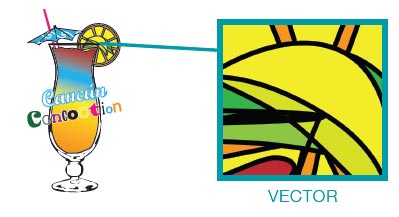
What is Vector art?
Art that is created within a graphics program such as Adobe® Illustrator or CorelDRAW®. Vector art can be scaled up or down from any size and not lose visual resolution within the image.
What is Raster art?
Raster art or bitmap is a piece of art that is made up of a grid of pixels. Such as when you take a picture with your phone or camera. Because Raster art is made up of pixels resolution is very important when dealing with this type of file.

What does a "missing file" mean?
A missing file is an image that needs to be "embeded" into your art file. If you have a missing file and you're not sure how to embed it just send it separately and our graphics team will add it into your artwork.
How do I embed an image?
To embed an image in Adobe® Illustrator all you have to do is simply have the image selected and click the button at the top of the window just beneath the menu bar that says "embed".
How do I convert my text to outlines/curves?
If you are working in Adobe® Illustrator here are ways to convert your text to outlines.
- With the text selected, right click and select "Create Outlines"
- With all of the art selected click the "Type" menu at the top of menu bar then select "Create Outlines"
- With all of the art selected use the shortcut command Shift+Ctrl+O (PC) Shift+Cmnd+O (MAC)
What is a bleed area?
A bleed area is an area that extends from the edge of the product to ensure that the artwork is printed covering the entire product area. A bleed can extend from ½" or more past the product edge.
How do I know what type of file I have?
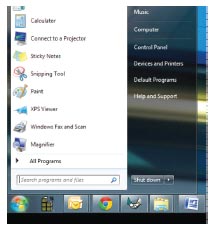
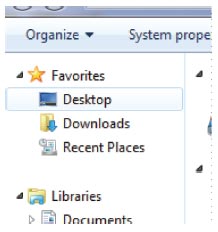
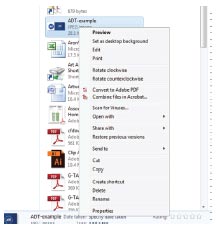
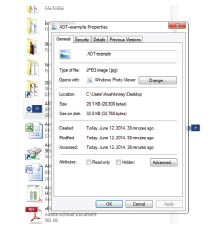
To see the details of the file you have just follow the steps below. We have also added screen shots to help you along the way.
Start Menu > My Computer > Desktop > Right Click on the File > Properties
Here is a list of common software and their file types.
| SOFTWARE | FILE TYPE |
| Adobe® Suite Adobe® Acrobat Microsoft Office CorelDRAW® Raster |
.ai, .psd, .ind, .eps .doc, .pub, .ppt .cdr .jpg, .png, .gif, .bmp, .tif |
If you have not found an answer to any questions that you may have please submit them to your sales representative and we will work on getting those answered and added to the FAQ page, thank you.