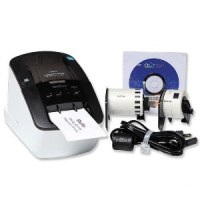


Save your organization time and money by printing professional name tags and registration packet labels at your event. The Brother™ Wireless On-Site Label Printer can print up to 93 labels per minute to keep your meeting and conference registration lines moving quickly. You can print from your Windows or MAC laptop or from your smartphone using the Brother™ iPrint&Label app. This printer uses a thermal printing process so there is no need for ink or toner. Call or chat with a MARCO representative to learn more about the benefits of printing your own name tags today!
Video Transcript
Martha: "Hi, I'm Martha with MARCO, here to show you a step-by-step tutorial on how to use the Brother™ Wireless On-Site Label Printer!"
Martha: "Here's how to get started. Open the back cover and load your label roll of choice inside, make sure to use the media guide to slide the spool in correctly. After that, insert the end of the label into the output slot. Close the cover and turn the power on."
Martha: "Connect your Windows or Mac computer, tablet or mobile device to the printer wirelessly with WI-FI on. For another option, A USB cable is provided for you to use at your convenience."
Martha: "To start, install the driver and label design software online from the Brother™ support Website or if you're printing on your phone, download the Brother™ iPrint&Label phone app for free!"
Martha: "While working on your computer, you can also easily export text from Microsoft Word or Excel into your computer software. Be sure to download and follow along with our simple set-up instruction guide on our website!"
Martha: "Once you're ready, create your labels on your electronic device or computer and then simply print."
Martha: "You can print one label at a time or print multiples. The Brother™ printer can print up to 93 labels per minute!"
Martha: "Plus, you can professionally print on clear adhesive labels and place them on blank name badges, allowing you to have the same look and feel of the original badge design. You can also stick these labels on re-usable badges as well!"
Martha: "Not only will this printer speed up your registration line at any small or large event, but it's also perfect to use in the office for making quick labels for envelopes, registration packets and more!"
Martha: "This printer uses a direct-thermal printing process with drop-in rolls that does not require ink or toner to be installed. Check out our website for our full list of available label stock!"
Martha: "It is item SLP-16004 on MarcoPromos.com, or call 877.592.4980. Remember, Promote More. Spend Less. Guaranteed!® with MARCO."